SceneSense brings camera control, live video, local object detection, and a media browser into one Linux application. I built it with C++20 and Qt Quick, with a desktop interface for development and a fullscreen interface for an embedded display.
The idea is to turn an action camera and a Linux computer into a small camera workstation: connect to the camera, choose how it captures, watch the scene, and inspect what a local vision model recognizes. The camera produces the video; the computer handles the interface and inference. This division also gives the project a path from a desktop application to a dedicated Raspberry Pi device.
A complete camera workflow
The interface follows three main activities: connecting a device, working with the camera, and reviewing its media.
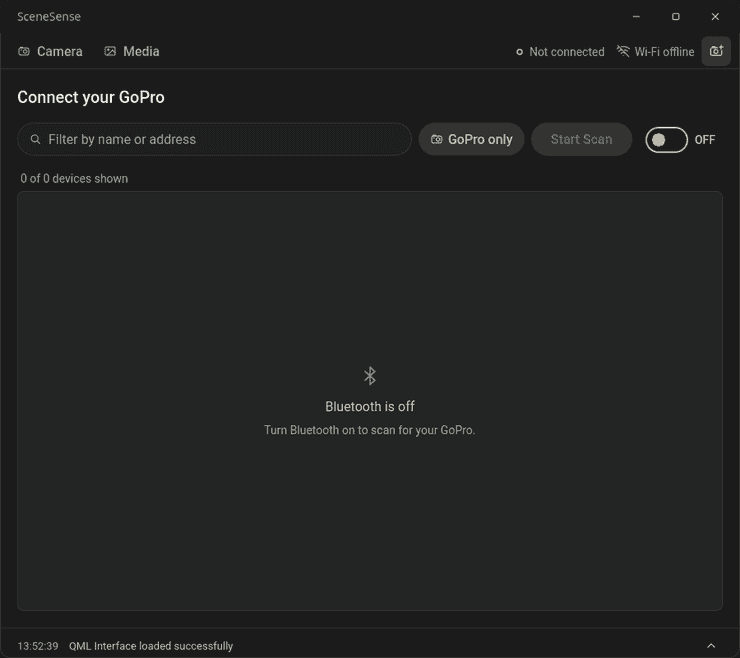
On the Devices page, the application discovers cameras, handles pairing prompts, and establishes the Bluetooth control connection. That handshake enables the camera's access point, after which NetworkManager connects Linux to the camera's Wi-Fi. Bluetooth and Wi-Fi have different jobs here: establishing a control relationship is a separate step from receiving the video stream.
On the Camera page, live preview starts when Wi-Fi is ready. A collapsible panel exposes Video, Photo, and Timelapse settings and capture controls, while fullscreen preview gives the video more space on a touch display. The current controls target the GoPro HERO13; available settings depend on the camera firmware, mode, preset, and lens.
The Media page lists camera files, displays photos, plays videos, and supports downloading them. This keeps reviewing a capture within the same application as taking it.
I also added connection recovery. The application remembers the selected paired camera, can reconnect its control service on startup, and monitors the Wi-Fi connection. An explicit disconnect suspends automatic retries for that session; unpairing forgets the selected camera. Those distinctions matter because a user's intentional action should not be immediately undone by recovery logic.
Separating the interface from camera and vision work
Qt Quick owns the visual interface. C++ controllers expose connection, camera, and media state to QML, using the GoPro and BLE libraries underneath. Linux-specific connectivity is handled through BlueZ and NetworkManager. The reusable Bluetooth layer is described in Qt Connectivity BLE.
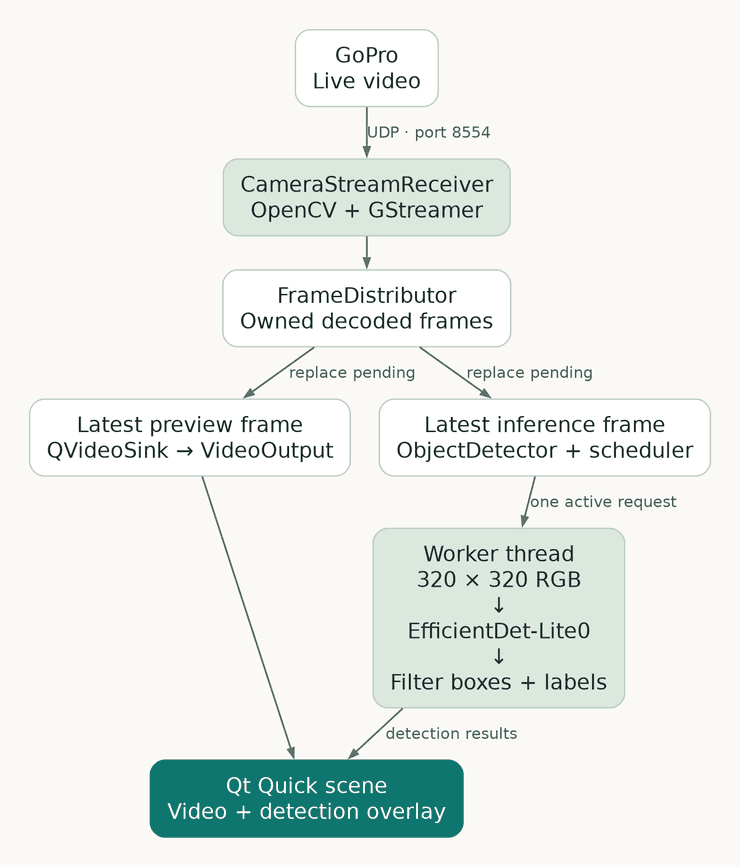
The video path has its own responsibilities. CameraStreamReceiver uses OpenCV and GStreamer to receive and decode the camera's UDP stream. CvPipeline manages capture and hands frames to Qt. ObjectDetector schedules inference, and a worker runs preprocessing and the LiteRT model away from the GUI thread.
Keeping the preview current
Running detection on every arriving frame can create a backlog when inference takes longer than the time between frames. Eventually, the application would be processing an old scene while the camera has already moved on.
I use a latest-frame policy instead. A FrameDistributor keeps one replaceable pending frame for preview and one for inference. New frames replace pending work that has not been consumed. The detector allows one active inference request, so a busy worker does not accumulate a queue of model calls. When it is ready again, it can take the newest available frame.
Each published frame carries an identity and stream generation, and its image storage remains valid while consumers hold it. This prevents the capture thread from overwriting pixels that another thread is still reading. Stream and configuration checks also reject results that belong to an earlier connection or detector configuration.
Preview and inference can therefore run at different rates. The default inference submission interval is 100 ms; the Pi development profile uses 200 ms. These intervals limit how often frames enter the detector; actual detection throughput also depends on inference time.
From decoded pixels to detection boxes
The detection pipeline has four steps:
- Prepare the input. Convert an accepted frame into the model's 320 × 320 RGB byte input. The default resize stretches the image; an optional letterbox policy preserves its aspect ratio and records the padding geometry.
- Run local inference. EfficientDet-Lite0 runs on the CPU through LiteRT's
CompiledModelAPI. Model and tensor buffers are reused across calls. - Interpret the outputs. Read boxes, class IDs, and confidence scores, reject invalid or low-confidence results, and associate class IDs with COCO labels. Letterboxed results are mapped back out of the model's padded coordinates.
- Draw in the right place. Map the boxes into
VideoOutput.contentRect, which represents the displayed image inside the preview. This accounts for resizing and black margins around the video.
The interface exposes a confidence threshold, object count, and processing time. The timing is useful for inspecting detection work, but it is not video FPS or camera-to-screen latency. Boxes can also trail moving objects because inference finishes after its input frame was captured; the current implementation does not add tracking or delay the video to align it with an older result.
Detection is an application overlay. It does not modify the camera's recordings, and model initialization failure does not have to remove the live preview.
Making failures visible
A frozen picture can look deceptively like a live scene. During a temporary stream failure, SceneSense retains the last frame, dims it, and marks the preview as paused while recovery is attempted. Leaving the Camera page or disconnecting clears it.
For the Pi, the development configuration also limits preview dimensions and display conversion rate, leaving CPU time for decoding and inference. Optional diagnostics expose receive, preview, and inference rates and application frame-replacement counters. These make it possible to distinguish a slow detector from a slow preview path without treating one timing number as the performance of the entire system.
From application to embedded device
The project brings together Linux connectivity, asynchronous C++ components, a Qt Quick interface, and a local vision pipeline. It can serve as a base for an interactive camera station or an embedded vision experiment, with the camera protocol and inference model kept behind clear boundaries.
The second part covers the Raspberry Pi image, boot integration, and matching cross-compilation SDK.